1-Click Resale (URL-Based Integration)
Enable a seamless resale experience directly from your brand’s order history page by embedding a "Resell" button next to each eligible item. This lightweight URL-based integration connects your customers with resale partners in one click
Overview
EON 1-Click Resale lets customers list products for resale with product data prefilled. Deploy it from existing order history and account experiences, or from serialized Digital Product Passports powered by EON Digital IDs.
EON supports both product-level identifiers (GTIN, Internal Product IDs) and item-level serialized identifiers (RefID, SGTIN, and existing m-brand serialization schemes) — so you can launch quickly today and expand to item-level lifecycle tracking over time.
Launch resale for historical purchases without product serialization, while still supporting item-level serialized products when they're available.
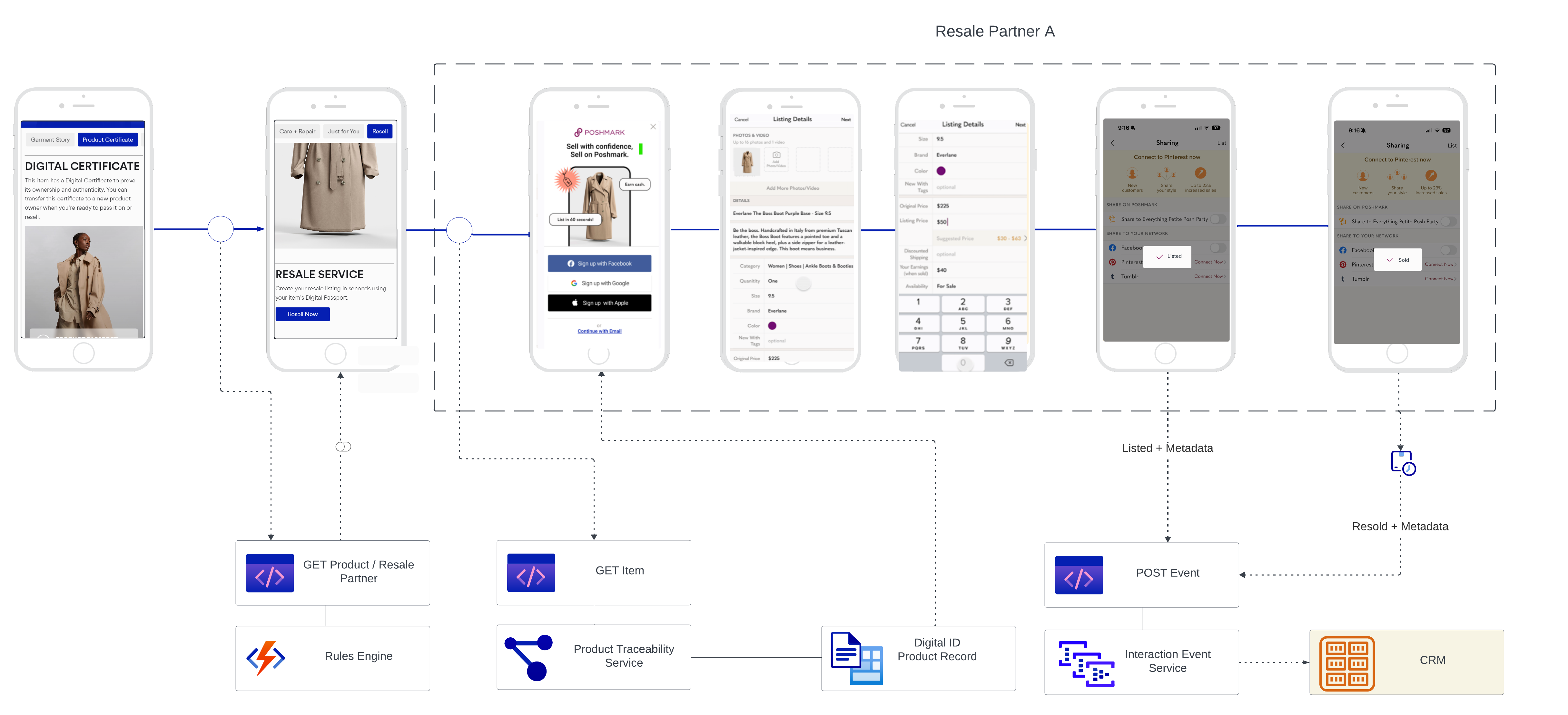
How 1-Click Resale works
- 1Customer views a previously purchased product, or scans/taps a serialized Digital ID.
- 2Customer clicks the Resell CTA.
- 3EON identifies the product using the provided identifier.
- 4EON evaluates the configured resale routing rules.
- 5The customer is redirected to the appropriate resale marketplace.
- 6Product information pre-populates the resale listing.
- 7Listing and resale lifecycle events are captured and returned to EON.
Supported customer experiences
1-Click Resale can be deployed using historical purchase data, serialized product data, or both.
Option 1 Historical purchases
Add a Resell button to existing customer experiences such as order history, account pages, purchase history, loyalty portals, ownership experiences, and post-purchase emails. When a customer clicks Resell, EON uses the product identifier associated with the purchase to retrieve product information and route the customer to the appropriate marketplace.
No product serialization is required for this approach.
Option 2 Serialized products & Digital IDs
For brands leveraging serialized products, 1-Click Resale can be activated from Digital Product Passports, QR codes, NFC tags, product authentication experiences, ownership registration experiences, and connected products. EON supports multiple item-level serialization strategies:
- EON RefID — EON's item-level digital identifier.
- SGTIN — GS1 Serialized Global Trade Item Number.
- Brand Serialization — existing item-level identifiers generated and managed by the m-brand.
- Third-Party Serialization — item-level identifiers from approved partners or existing serialization platforms.
When a serialized identifier is available, EON can identify the specific product instance rather than just the product model, enabling richer lifecycle tracking and reporting:
- Item-level resale tracking
- Ownership history
- Enhanced circularity reporting
- Product authentication
- Digital Product Passports
- Lifecycle visibility across owners
Required product data
| Field | Required | Purpose |
|---|---|---|
| Product Name | Required | Identifies and describes the product in resale experiences. |
| Brand | Required | Marketplace listing attribution and product matching. |
| Primary Image | Required | Visually pre-populates resale listings. |
Recommended product data
| Field | Purpose |
|---|---|
| GTIN | Product-level identification and lookup. |
| SKU | Commerce and catalog matching. |
| Internal Product ID | Product-level identification and lookup. |
| Category / Subcategory | Marketplace taxonomy mapping and routing eligibility. |
| Description | Listing pre-population and customer review. |
| Color / Size | Listing accuracy and marketplace filtering. |
| Material Composition | Product detail enrichment and sustainability reporting. |
| Original Retail Price | Pricing guidance and resale analytics. |
| Gender | Marketplace category enrichment and reporting segmentation. |
| Selling Season | When the product hit the market. Used in reporting to assess the age of listed products. |
| Additional Images | Improves listing quality and conversion. |
Add a Resell CTA
Add a Resell CTA anywhere a customer has a relationship with a product:
- Order History
- Account Pages
- Purchase History
- Loyalty Experiences
- Digital Product Passports
- Ownership Portals
- Product Registration
- Email Campaigns
Dynamically merge the product identifier determined during data discovery and ingestion — into the CTA URL.
# Using GTIN
https://cnnct.id/g/{insert_GTIN}/?r=resale

# Using Internal ID
https://cnnct.id/o/27/i/{insert_Internal_ID}/?r=resale

# Using Reference ID
https://cnnct.id/r/{insert_RefID}/?r=resale
Identifier selection guidance
| Identifier | Type | Recommended use |
|---|---|---|
| Serialized item | EON Digital IDs and Digital Product Passports. | |
| Serialized item | GS1-compliant item-level serialization programs. | |
| Brand Serialization | Serialized item | Existing item-level identifiers managed by the m-brand. |
| Product | Product-level catalog integrations. | |
| Internal ID | Product | Product-level catalog integrations. |
Optional query parameters
| Parameter | Description | Example |
|---|---|---|
| Filters configurations by resale partner name. | ||
| Filters configurations by geographic location. |
Combined example:
https://cnnct.id/g/00812345678901/?r=resale&r_name=poshmark&r_location=us
Resale rules configuration
EON configures dynamic partner routing during onboarding. Each product, location, or business m-rule can carry
tailored logic via
- Geography
- Product category
- Product type
- Marketplace availability
- Brand resale requirements
Example configuration redirect_url_configurations.json
{
  "redirect_url_configurations": {
    "resale": [
      {
        "name": "poshmark",
        "enabled": true,
        "priority": 1,
        "locations": ["us", "cn"]
      },
      {
        "name": "Depop",
        "enabled": true,
        "priority": 3,
        "locations": ["uk"]
      },
      {
        "name": "ResaleExample",
        "enabled": true,
        "priority": 2,
        "locations": ["uk"]
      },
      {
        "name": "ResaleExample2",
        "enabled": true,
        "priority": 3,
        "locations": ["cn"]
      },
      {
        "name": "default",
        "enabled": true,
        "priority": 100,
        "locations": []
      }
    ]
  }
}
Resale lifecycle reporting
Participating resale partners send lifecycle events back to EON, so you can measure customer engagement, listing activity, and resale performance.
| Event | Description | Example metadata |
|---|---|---|
| resale.started | Customer initiates the resale journey. | sourcetimestampproduct_idlocation |
| listing.created | Product is successfully listed for resale. | marketplacelisting_idlisting_urltimestamp |
| listing.updated | Listing details are modified. | marketplacelisting_idupdated_fieldstimestamp |
| listing.removed | Listing is cancelled, removed, or expired. | marketplacelisting_idremoval_reasontimestamp |
| product.sold | Product is successfully resold. | marketplacelisting_idsale_timestampsale_status |